
The mobile multistreaming app for going live in more than one place
You have one phone, one camera, and one internet connection. Pushing a separate full stream to Facebook, YouTube, and LinkedIn from that phone would choke your upload and cook your battery before the first comment lands.
A mobile multistreaming app solves it: your phone sends a single live feed to the cloud, and the cloud delivers a copy to every platform you connected. Go live once, show up everywhere, no laptop and no capture card.

Can you multistream from a phone?
Yes. You can multistream from a phone with a cloud based multistreaming app.
The app sends one live feed from your smartphone up to a cloud service, and the cloud copies that single broadcast out to each platform you connected. You stream once, the cloud handles the fan-out, so your phone never uploads a separate full stream to every destination. That steady, low-effort upload is exactly what a mobile multistreaming app is designed to give you.
What mobile multistreaming actually means
One live broadcast, sent up once, landing on every platform at the same time.
Regular mobile live streaming sends your video to one place. You open Instagram, tap Live, and that's where it stays. Mobile multistreaming means one live broadcast reaches several platforms together, so the same moment shows up on Facebook, YouTube, LinkedIn, Twitch, and other destinations at once. A mobile multistreaming app is simply the tool that makes that one-to-many broadcast possible from a phone.
The part that trips people up is where the copying happens. If your phone had to push a separate full-quality stream to every platform, you'd need several times the upload speed, and most home or mobile connections can't hold that for long. Frames drop, the picture softens, and the phone runs hot.
A cloud multistreaming app sidesteps the whole problem. Your phone sends one stream up. The cloud service duplicates it and delivers a copy to each destination you set, so battery drain, heat, and dropped frames stay manageable even on a long broadcast. For the wider picture on going live from a phone, the complete mobile live streaming guide covers gear, settings, and habits that make streams look sharper.
How a mobile multistreaming app works
A mobile multistreaming app runs all of this for you. Five stages take you from a phone in your hand to a broadcast running across every platform you chose.
Step 1 Capture video from your phone
Point the front or back camera, portrait or landscape. This is your one source, the same as any normal live stream.
Step 2 Send one live feed to the cloud
The app uploads a single stream over your internet connection. One feed goes up, regardless of how many places you plan to appear.
Step 3 Connect your destinations
Choose where the broadcast should show up: Facebook, YouTube, LinkedIn, Twitch, or a custom RTMP target with a stream URL and key.
Step 4 Go live everywhere at once
The cloud copies your feed to each connected platform in real time. Viewers on every network see the same moment together.
Step 5 Manage interactions and review results
Watch comments, reactions, and viewer counts from supported platforms in one view, then check analytics after you end to see what landed.
Reach the networks where your audience already watches


Platform coverage and what to expect
Different networks grant live access in different ways, and a good mobile multistreaming app connects to each of these in a few taps. Here is what each type of destination usually involves.
Go live to profiles and pages. Business pages help when you want the stream tied to a brand rather than a personal timeline.
YouTube
Reach your channel, including multi-channel and Brand Account setups. New channels sometimes need to enable live streaming first.
Broadcast to a professional audience when your profile or page has live video access enabled.
Twitch
Send your feed to your channel for gaming, talk shows, music sets, or anything your community tunes in for.
Custom RTMP
Any platform that gives you a stream URL and key becomes a destination. This is how you reach networks beyond the built-in list.
Instagram and TikTok
Reachable as custom RTMP or stream key destinations when your account has live access. Eligibility is set by each platform, not by the app.
Check permissions before you go live. Every network controls its own live streaming access, and requirements change over time. Confirm each account is eligible and connected in advance. If you are weighing which networks to run together, this breakdown of how to plan your platform mix is a practical starting point.
Real people who go live to more than one place
If any of these sound like your week, a mobile multistreaming app earns its keep.
Turn one broadcast into every feed you built
You grew an audience on more than one network. Post the same live to YouTube and Facebook at once instead of asking followers to switch apps, and run a product drop across a page and a shop feed so no buyer misses it.
Play the set once
Let fans join from wherever they hang out, whether that is Twitch regulars or the Facebook crowd from your last show.
Cover the match from the stands
One phone. Parents watch on Facebook, the wider community catches it on YouTube, and your watermark marks the rights.
Broadcast the room without a production rig
Stream a conference talk or a community event to the networks your attendees and sponsors actually use, straight from a phone on a tripod.
Keep the brand front and center
Run a product launch, a training, or a live Q&A to LinkedIn and YouTube together, with a custom watermark holding your brand on every feed.
How to choose a mobile multistreaming app
No two apps behave the same way mid-broadcast. Use this checklist to compare any mobile multistreaming app you're looking at, including this one, on the things that only surface once you're live.
| Feature | Why it matters | What to verify |
|---|---|---|
| Simultaneous destinations | Sets how many platforms one broadcast can reach at the same time. | Check the exact limit on the plan you would actually use, not the top tier. |
| Video quality | 1080p looks sharp on a phone screen and a TV. Lower resolutions show it. | Confirm the maximum resolution and whether it is capped on the free plan. |
| Cloud distribution | Cloud fan-out keeps your phone uploading one feed instead of many. | Make sure copying happens in the cloud, not on the device. |
| Platform support | Built-in support for a network usually means a smoother connect flow. | Look for the specific platforms you care about in the supported list. |
| Custom RTMP | RTMP is your escape hatch for any platform not built in. | Confirm you can add a custom stream URL and key. |
| Branding | A watermark protects your brand and broadcasting rights across every feed. | Check whether you can upload your own logo, not just remove a default mark. |
| Live interaction | One place for comments, reactions, and viewer counts beats juggling tabs. | See which platforms feed their chat and counts into the app. |
| Analytics | Post-stream numbers tell you what to repeat and what to drop. | Confirm what is measured and how far back the history goes. |
| Ease of setup | A phone-first flow means no OBS, no capture card, no laptop. | Test how many taps it takes to connect a destination and go live. |
| Mobile workflow | Some tools are desktop studios that treat the phone as a side camera. | Verify the app runs the whole broadcast natively on the phone. |
| Plan limits | Stream length, monthly caps, and destination counts vary by tier. | Read the free plan limits and what the paid tier unlocks before you rely on it. |
A mobile multistreaming app built to run from one phone
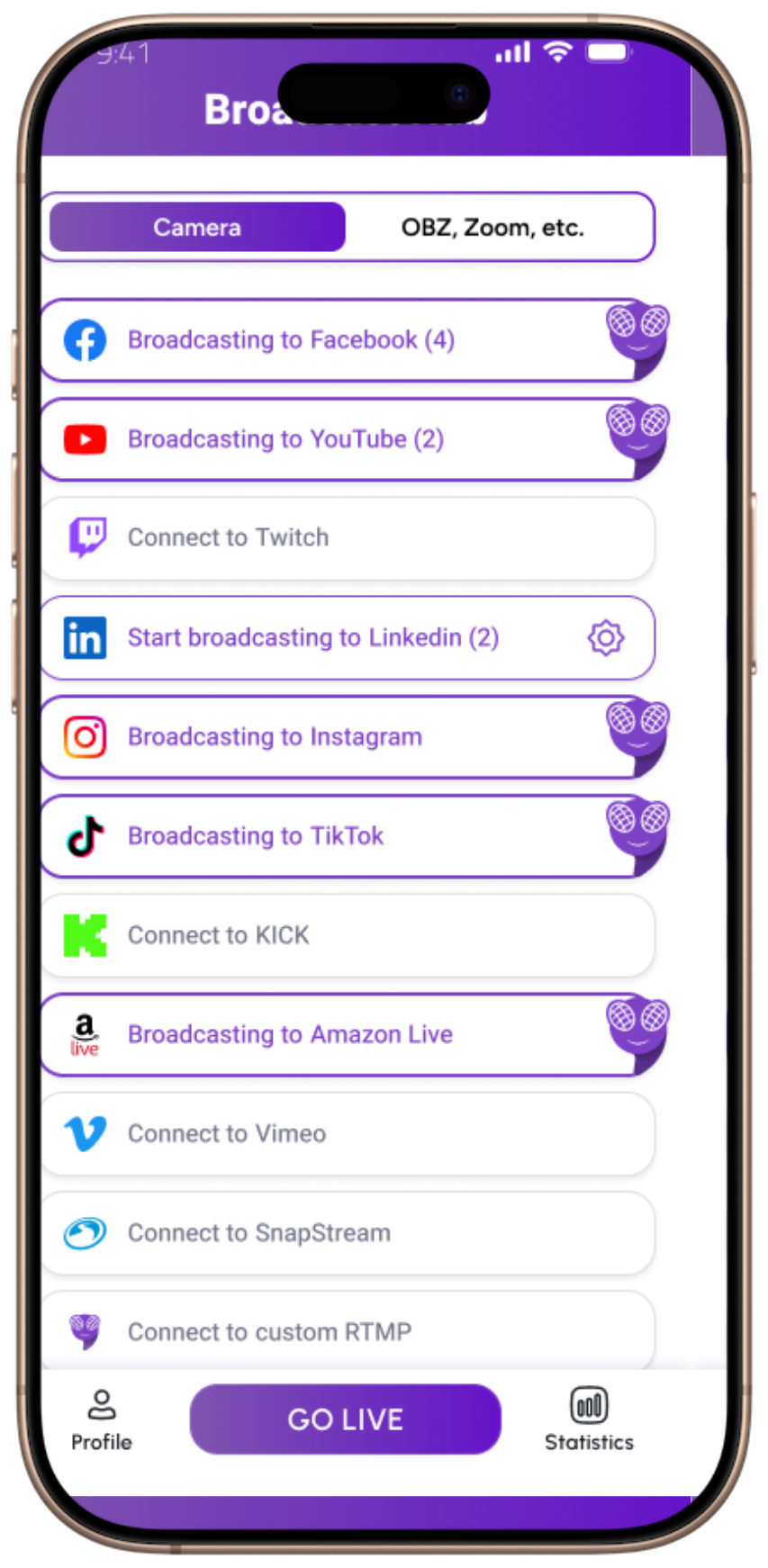
FeelThere is a mobile multistreaming app for iOS and Android, built around cloud distribution. You broadcast from one smartphone to up to eight destinations at once, and the cloud handles the fan-out so your phone keeps uploading a single feed. It suits creators, live sellers, musicians and DJs, sports clubs, event organizers, businesses, and communities who already go live and want each broadcast to reach more people. If you're comparing options, this rundown of mobile live streaming tools gives more context on where a native app fits.
Up to 8 destinations at once
Reach several audiences from one mobile broadcast. Connect Facebook, YouTube, LinkedIn, Twitch, and custom RTMP targets, and open more mid-stream.
Full HD 1080p from your phone
Deliver sharp, professional live video straight from the device, up to 1080p on Premium.
Cloud stream distribution
Your phone sends one feed up and the cloud copies it out, which keeps a multi-platform broadcast stable on a normal connection.
Custom watermark
Add your own logo or ownership mark for branding and broadcasting rights, and it stays on every destination.
Live chat and reactions
See comments, reactions, and live viewer counts from supported platforms in one place instead of switching between apps.
Creator Hub analytics
Review how each broadcast performed after you end, so the next one is a little sharper than the last.
One honest caveat. FeelThere connects your destinations, but it cannot grant live access on your behalf. Each platform decides your eligibility, so a Facebook page, a YouTube channel, or an Instagram account still needs its own live permission before it can receive your stream. The free plan streams to two destinations, and reaching up to eight comes with Premium, which includes a 14-day trial.
Straight answers, no runaround
Can you multistream on mobile?
Yes, you can multistream on mobile. With a cloud based mobile multistreaming app, one phone broadcasts to several platforms at the same time. The app uploads a single live feed, and the cloud sends a copy to each destination you connect, such as Facebook, YouTube, LinkedIn, and Twitch. You do not need a laptop or a capture card to do it.
What is the app for multistreaming?
The app for multistreaming is any live streaming tool that takes one video source and delivers it to multiple destinations at once. On a phone, that means a mobile app that streams your camera to the cloud, then distributes it to each platform you selected. FeelThere is one example, built to run the whole workflow from a single smartphone.
What is the best multistreaming service?
The best multistreaming service is the one that fits how you actually go live. Judge it on the number of simultaneous destinations, video quality, whether distribution runs in the cloud, custom RTMP support, branding, live chat, and analytics. If you broadcast from your phone rather than a desk, a mobile first app matters more than a heavy desktop studio.
Is there an app that combines all my streaming services?
Yes. A multistreaming app combines your streaming services by connecting each platform once, then sending a single live broadcast to all of them together. Instead of picking one network per stream, you reach Facebook, YouTube, LinkedIn, Twitch, and custom RTMP destinations from the same session, and manage comments and viewer counts from supported platforms in one place.
Can I stream to Facebook and YouTube at the same time from my phone?
Yes. Connect both accounts in the app, then start one live broadcast. The cloud service sends your single feed to Facebook and YouTube together, so viewers on each platform see the same stream at the same time. You will need live streaming access on each account, which most established pages and channels already have.
Does mobile multistreaming use more data and battery than a normal stream?
With a cloud based app, not much more. Your phone uploads one live feed no matter how many destinations you pick, so data use stays close to a single stream rather than multiplied per platform. The cloud does the copying. A long broadcast still drains battery and needs steady upload, so a charger and a stable connection help.
Do I need OBS or a computer to multistream from a phone?
No. A mobile multistreaming app handles capture, upload, and distribution for you, so there is no OBS, no capture card, and no laptop in the workflow. You point your phone, connect your destinations, and go live. Desktop tools like OBS still suit studio setups, but they are not required to multistream from a phone.
Can I put my own logo on a mobile live stream?
Yes. FeelThere lets you add a custom watermark, so your logo, brand mark, or ownership mark stays on screen across every destination you broadcast to. It is useful for businesses protecting their brand, sports clubs marking rights, and creators who want a consistent look wherever the stream appears.
One broadcast. Wider reach. Less to carry.
Multistreaming from a phone trades a room full of gear for a single app. You go live once, the cloud sends it everywhere you chose, and your brand, your chat, and your numbers stay in one place. When you're ready to run it from your own phone, FeelThere is the mobile multistreaming app built for exactly this. Start free and add destinations as your audience grows.